Tenant access and roles#
Access is decided by the identity-provider groups in the user's token. For each tenant, the extension renders a group name from a pattern and writes an OAuth org-mapping entry pointing that group at the tenant's organisation with a Grafana role.
| Tenant role | Default group pattern | Grafana role | Where it applies |
|---|---|---|---|
| Owner | tenant-<tenant>-owners |
Admin | The tenant's organisation |
| Editor | tenant-<tenant>-editors |
Editor | The tenant's organisation |
| Viewer | tenant-<tenant>-viewers |
Viewer | The tenant's organisation |
| Cluster administrator | clusteradmin \|\| cluster-admin |
Grafana server administrator | Every organisation |
For tenant pe, a user whose token carries tenant-pe-editors gets Editor in the pe organisation. Someone carrying tenant-pe-owners and tenant-team-a-viewers gets Admin in one and Viewer in the other, in the same session.
Note
Grafana access follows the group names your identity provider emits, not the accessControl lists on the Tenant resource. The extension builds the expected group name from the tenant name and the pattern field — it does not read the tenant's users or groups entries. If your identity provider names groups differently, change pattern rather than the tenant.
Note
The default fallback: deny is easy to misread: it does not block the login. The extension sets roleAttributeStrict: false on purpose, so a user whose real roles arrive through org_mapping is never locked out. What deny means is that a user matching no pattern gets no server-level role and no tenant organisation — they can sign in, and find nothing there.
One organisation across a user's tenants#
Isolation has a cost, and it falls on the people who cross tenants: platform engineers, on-call responders, anyone who owns several services. Grafana shows one organisation at a time, so answering "which of my six tenants is unhealthy?" means visiting six organisations one after another — during an incident, at the worst possible moment.
Aggregated views remove that. Each user gets one extra organisation, Aggregate View — <login>, mirroring the dashboards, data sources and folders of every tenant they belong to — everything they are entitled to see, on one screen, with nothing they are not. Enable unionTraceDatasource as well and a single distributed trace can be followed across tenant boundaries, which no per-tenant data source can do.
flowchart LR
  OB["Org pe<br/>dashboards, datasources, folders"] -->|"mirrored"| FB
  OA["Org team-a<br/>dashboards, datasources, folders"] -->|"mirrored"| FA
  subgraph AV["Aggregate View — dana, one organisation"]
    FB["Folder [pe]<br/>Tempo (pe)"]
    FA["Folder [team-a]<br/>Tempo (team-a)"]
    UN["Tempo (all tenants)<br/>optional, spans both"]
  end
Content is copied in from each tenant the user belongs to, and labelled with where it came from. The union trace data source is the one thing that is not a copy of anything — it spans the whole view.
Everything inside it is labelled by origin, so it stays obvious which tenant a panel is reading from. Each tenant's dashboards land in their own folder, titled from folderPrefix — which is what keeps two tenants' copies of the same platform dashboard apart:
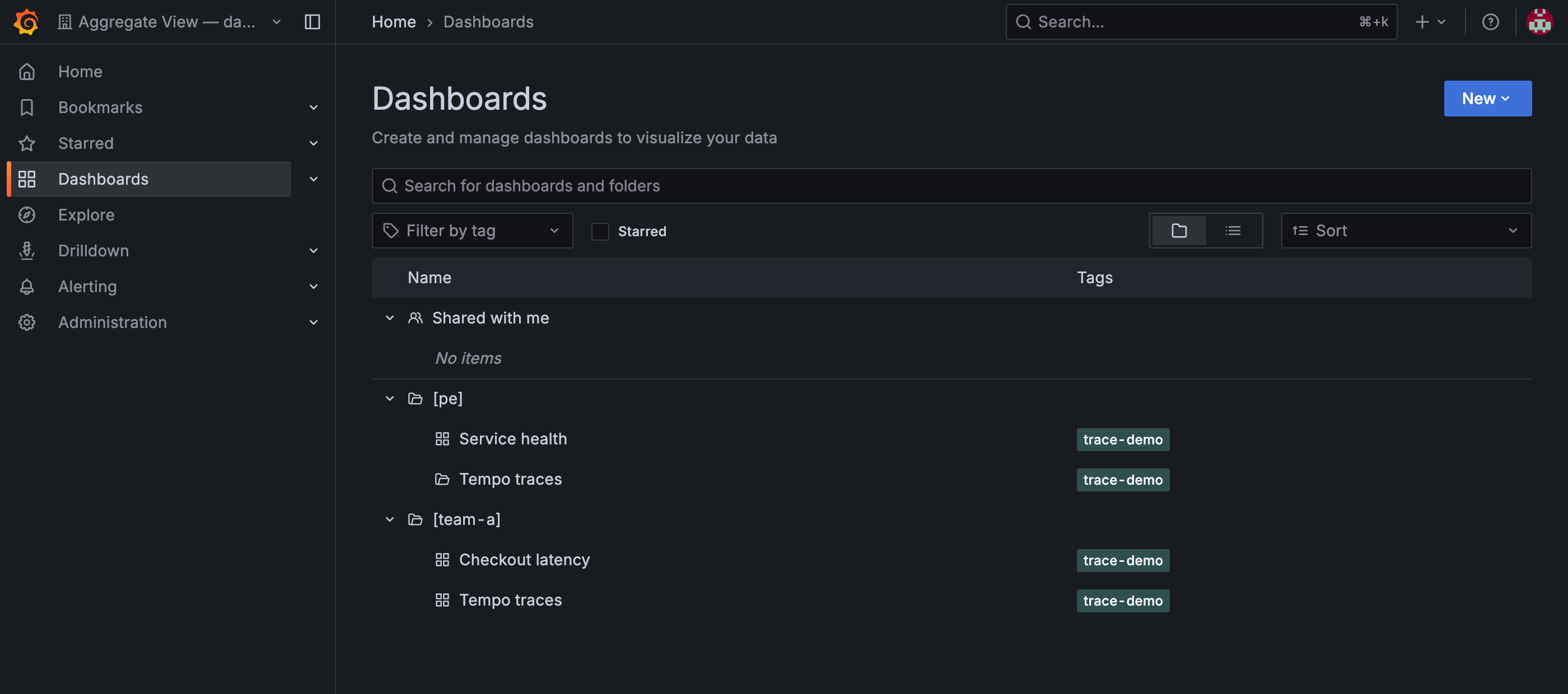
One user's aggregated view. Each folder holds that tenant's own dashboard — Service health for pe, Checkout latency for team-a — alongside Tempo traces, which both tenants run and which therefore appears twice. The [pe] and [team-a] prefixes are the only thing telling the two copies apart.
Data sources are labelled the same way: every mirror carries its tenant as a suffix, whatever its type — Tempo (pe), Tempo (team-a), and a Mimir (pe) or Loki (pe) alongside them if those tenants have such data sources. The optional cross-tenant data source is Tempo only, and is named Tempo (all tenants).
spec:
  aggregatedViews:
    enabled: true
    folderPrefix: "[{{ .Tenant }}] "     # optional
    useMinTenantRole: false              # optional
    mirrorManualDashboards: false        # optional
    shareUserDashboards: false           # optional
    unionTraceDatasource:                # optional
      enabled: false
| Field | Default | What it does |
|---|---|---|
enabled |
false |
Turns the feature on. Turning it off again leaves existing view organisations in place rather than deleting them. |
folderPrefix |
[<tenant>] and a trailing space |
Title prefix for each tenant's folder inside the view. {{ .Tenant }} is the only variable. |
useMinTenantRole |
false |
Viewer in the view by default. When true, the user gets the lowest of their tenant roles. |
mirrorManualDashboards |
false |
Also mirror dashboards created by hand in a tenant organisation, not just those backed by a GrafanaDashboard. |
shareUserDashboards |
false |
Share dashboards a user builds inside their own view with colleagues whose tenant access covers the same data. Needs useMinTenantRole: true to do anything — a Viewer cannot create a dashboard to share. |
unionTraceDatasource.enabled |
false |
Add one cross-tenant Tempo data source to each view. |
Roles inside the view#
The default Viewer role is the safe choice, but Grafana Explore requires Editor or above, so ad-hoc queries and trace exploration are unavailable from the view until you set useMinTenantRole: true. That grants the lowest of the user's tenant roles, ranked Admin > Editor > Viewer:
- Admin in every tenant → Admin in the view.
- Editor in the weakest tenant → Editor in the view.
- Viewer in any one tenant → Viewer in the view. The most restrictive tenant wins.
So Explore becomes available to anyone whose weakest tenant role is Editor or better. Viewer is also the floor: an unrecognised role counts as Viewer, so a malformed membership can never promote someone. Grafana Editors cannot manage organisation membership, so none of this opens a path to cross-tenant content.
Cross-tenant traces#
Multi-tenant Tempo partitions traces by X-Scope-OrgID, so a per-tenant data source only ever returns one tenant's spans and a request crossing tenants cannot be followed end to end. Enabling unionTraceDatasource adds one <name> (all tenants) Tempo data source whose X-Scope-OrgID is the pipe-joined set of tenants already in that view, which Tempo merges on read.
- Access-preserving by construction — a view only ever contains the user's own tenants, so the union can never reach one they are not a member of.
- Additive — the per-tenant data sources stay.
- Tempo only. It needs a synchronized Tempo
GrafanaDatasourcecarrying anX-Scope-OrgIDheader; one without is skipped with a warning. - Users in a single tenant get no union data source, as it would duplicate their per-tenant copy.
- Pair it with
useMinTenantRole: trueto query it from Explore.
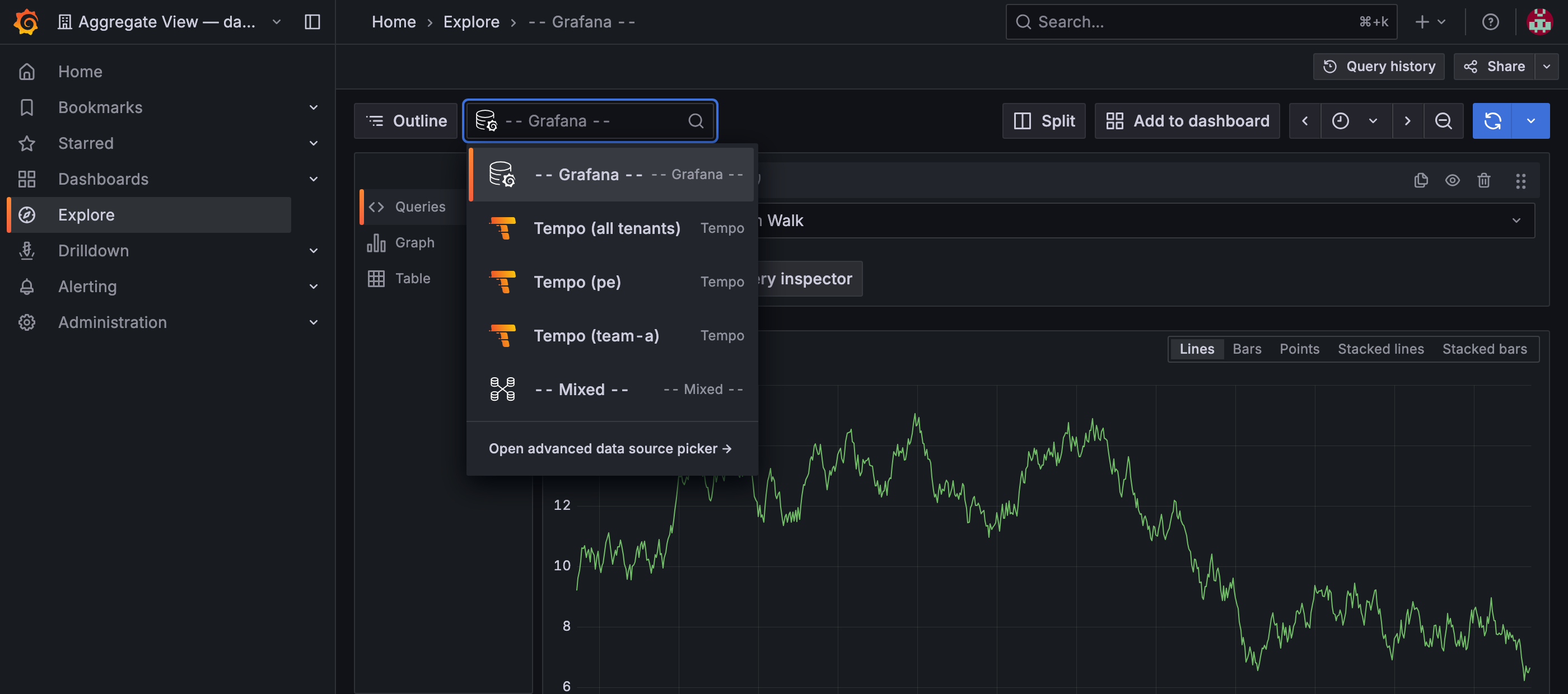
Explore inside an aggregated view. The user can query either tenant on its own, or Tempo (all tenants) to follow one trace across both. Explore is available here at all because useMinTenantRole granted Editor — at the default Viewer it would be closed.
What mirrored content does and does not allow#
Mirrored content is operator-owned and read-oriented:
- Mirror data sources are re-asserted every cycle, so a manual edit is undone within one reconcile.
- Mirror dashboards are hash-compared and only re-pushed when the source changes. That avoids reloading everyone's browser each cycle, but it also means an edit saved to a mirror survives until the source changes or the mirror is deleted.
- Make changes in the tenant organisation or in Git; they flow into every view that mirrors them.
The view follows the user's access:
- Losing access to a tenant removes that tenant's content from the view.
- Losing every tenant makes the view eligible for removal after a grace period — but a view holding dashboards the user created themselves is kept for manual review.
- Per-user state, including content counts and last sync time, is reported under
status.aggregatedViews.
Previous: Giving a tenant a dashboard · Next: Choosing which tenants get a resource