Uninstalling#
The custom resources must be deleted before the operator itself is removed. Deleting a ResourceSupervisor or ClusterResourceSupervisor restores every workload it put to sleep and, for a ClusterResourceSupervisor, removes the ArgoCD sync windows it applied. That work is done by the operator, so if the operator is removed first, the deletion of the resources does not complete and the hibernated workloads remain at zero replicas.
Uninstall in the following order.
1. Delete the custom resources#
While the operator is still running, delete every supervisor:
kubectl delete clusterresourcesupervisors.hibernation.stakater.com --all
kubectl delete resourcesupervisors.hibernation.stakater.com --all --all-namespaces
Each deletion completes once the operator has restored the workloads of that resource. Confirm that none remain before continuing:
kubectl get clusterresourcesupervisors.hibernation.stakater.com
kubectl get resourcesupervisors.hibernation.stakater.com --all-namespaces
If a deletion does not complete, inspect the events on the resource with kubectl describe. A failed restoration is reported there as a WakeFailed event, and the resource is retained until the restoration succeeds.
2. Remove the operator#
Helm#
helm uninstall hibernation-operator --namespace hibernation-operator-system
This removes the operator deployments, RBAC resources and services. Helm does not remove the CRDs, because the chart installs them from its crds/ directory.
OpenShift (OLM)#
In the OpenShift web console:
- Navigate to Operators → Installed Operators and select the
hibernation-operator-systemproject. - Open the actions menu for Hibernation Operator and select Uninstall Operator.
- Confirm the removal.
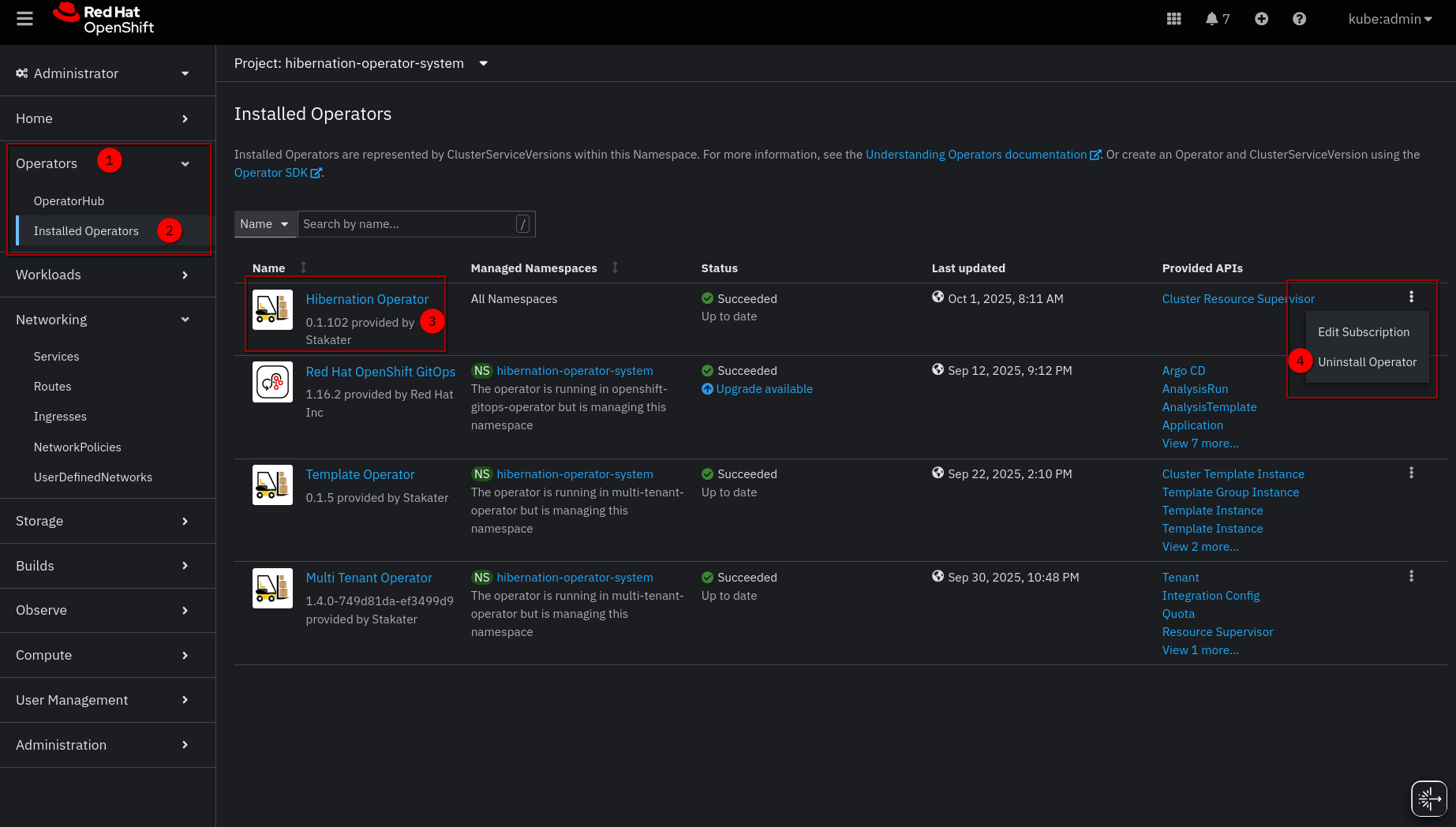
Alternatively, delete the Subscription and the ClusterServiceVersion with the CLI:
oc delete subscription hibernation-operator -n hibernation-operator-system
oc delete csv -n hibernation-operator-system \
  -l operators.coreos.com/hibernation-operator.hibernation-operator-system
OLM does not remove the CRDs either.
3. Remove the CRDs and the namespace#
Once no custom resources remain, the CRDs and the operator namespace can be removed:
kubectl delete crd \
  resourcesupervisors.hibernation.stakater.com \
  clusterresourcesupervisors.hibernation.stakater.com
kubectl delete namespace hibernation-operator-system
Recovering from an incorrect order#
If the operator was removed while supervisors still existed, their deletion remains pending. The simplest recovery is to reinstall the operator, which then processes the pending deletions and restores the workloads.
If reinstalling is not possible, record the replica counts from status.sleepingNamespaces of each pending resource, scale the workloads back manually, and then remove the finalizer that keeps the resource pending:
kubectl patch clusterresourcesupervisor <name> --type merge \
  -p '{"metadata":{"finalizers":null}}'
Removing the finalizer without first restoring the workloads discards the only record of their replica counts.