How to Connect to an OpenShift Cluster#
Learn how to reach a provisioned OpenShift cluster: join your organisation's mesh, open the cluster console, and sign in with your organisation identity.
Sam, a senior platform engineer at ACME Corp, has just provisioned a private cluster for a product team with an OpenShiftCluster claim. Before handing it over, Sam needs to confirm the team can reach the console and the API from their laptops.
Prerequisites#
- An OpenShift cluster whose claim reports
READY=True - The NetBird client installed on your device. The CLI alone is enough; the GUI is optional
- Membership of a group listed under the cluster's
access.groups. For a private cluster, that one membership gives you both the network path over the mesh and a role once you are signed in - For a private cluster, a Mesh enabled for your organisation
What Private Means#
A cluster created with the networking mode Private has no public address at all. Its API, console, sign-in endpoint and every application route are reachable only from devices enrolled in your organisation's mesh. Traffic from inside the cluster to the internet still works, so package installs and image pulls are unaffected.
A Public cluster is reachable from anywhere and needs none of the mesh steps below. Choose the mode when you create the cluster: it is the Mode field under Advanced in the create form.
Converting an existing public cluster to private is an administrator-assisted change that needs a maintenance window, not a field to flip yourself. The cluster keeps its workloads and configuration, but every node is replaced, so all workloads restart, and load balancers created on the cluster can lose their public address. Ask your platform administrator to plan it with you.
Publishing individual HTTP/HTTPS (80/443) applications to the internet from a private cluster needs your platform administrator; other ports cannot be published.
How Access Works#
Being in a group listed under access.groups gives you both the network path and a role. <cluster>-mesh-access is only for people who need network access without a role on the cluster. The two failure modes look nothing alike:
| What is missing | Symptom | Who is affected |
|---|---|---|
| A network path to the cluster's console, API and sign-in endpoints | Pages time out and nothing ever loads | Anyone not in a group under access.groups and not in <cluster>-mesh-access, or whose device is not enrolled in the mesh |
| A role on the cluster | You sign in successfully and land on an empty console that invites you to create a project | Members of <cluster>-mesh-access only |
The highest role access.groups can grant is customer-admin. cluster-admin cannot be granted through the claim.
Note
There is no local kubeadmin login on a cluster provisioned by the platform. The console sends you straight to your organisation's sign-in page, so an identity in your organisation is the only way in.
Step 1: Read the Cluster's Addresses#
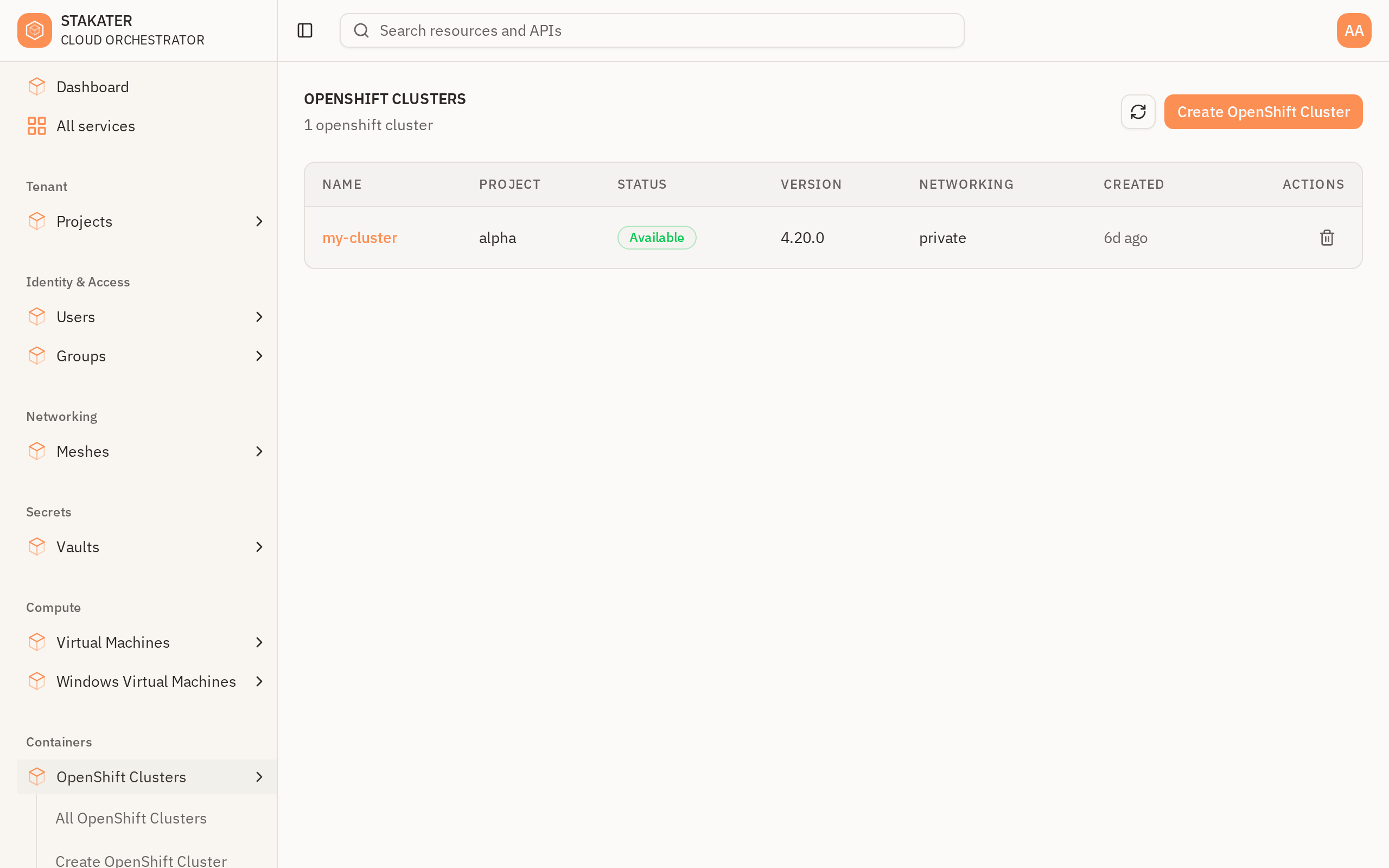
Open the cluster in the console. Clusters are under Containers in the sidebar. A cluster that is still provisioning shows Unknown in the list until its control plane reports in:
The detail page shows the phase and the access grants. The addresses are further down, in the Status block, which only renders in Advanced mode. Switch the toggle at the top right and scroll to it:
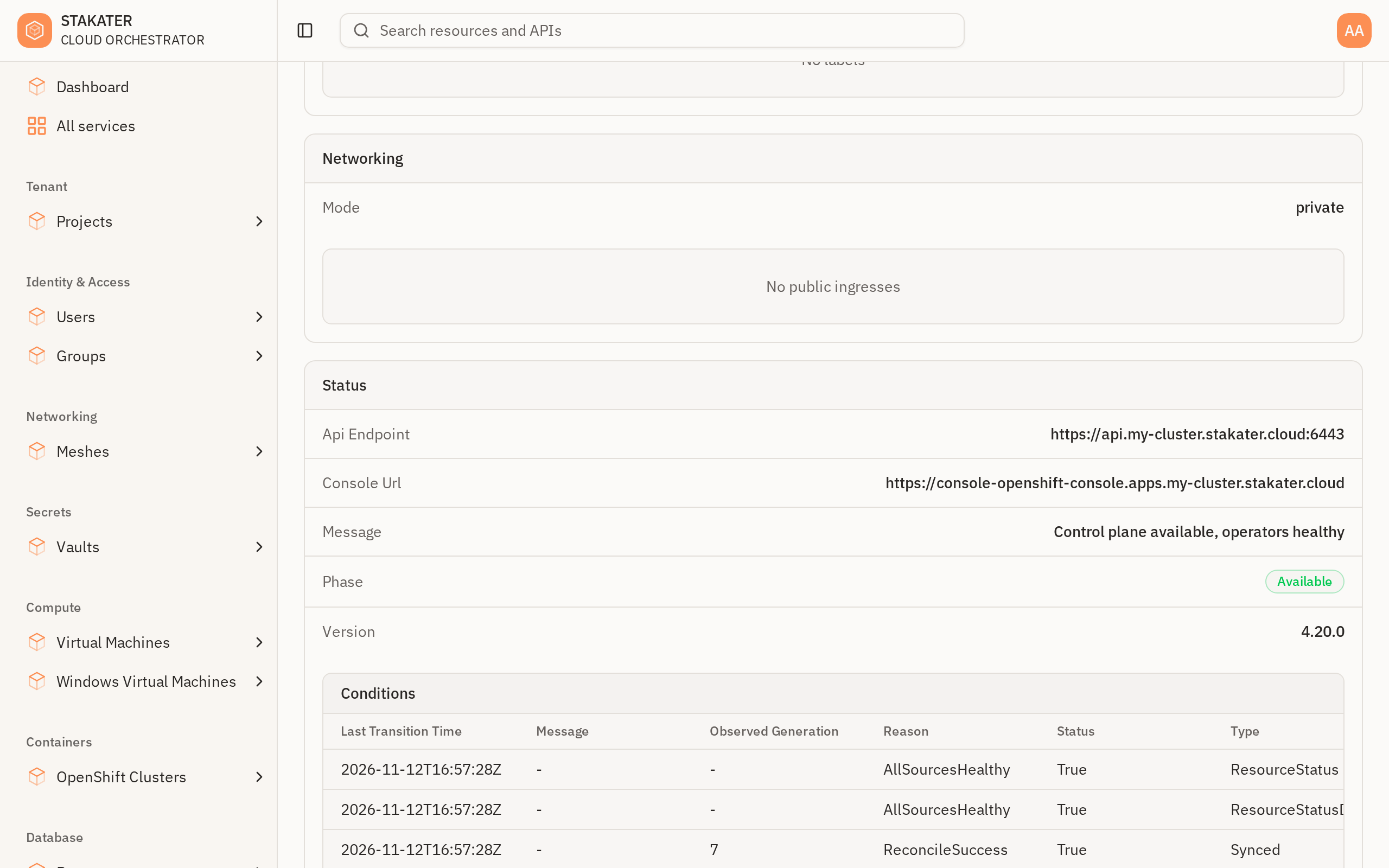
The same values are on the claim status:
kubectl get openshiftcluster my-cluster -o jsonpath="{.status.consoleUrl}"
kubectl get openshiftcluster my-cluster -o jsonpath="{.status.apiEndpoint}"
Step 2: Join Your Organisation's Mesh#
If your organisation has the mesh enabled, its default Mesh is under Networking in the sidebar; otherwise ask your platform administrator to enable it. The Mesh detail page shows the Management URL you enrol against:
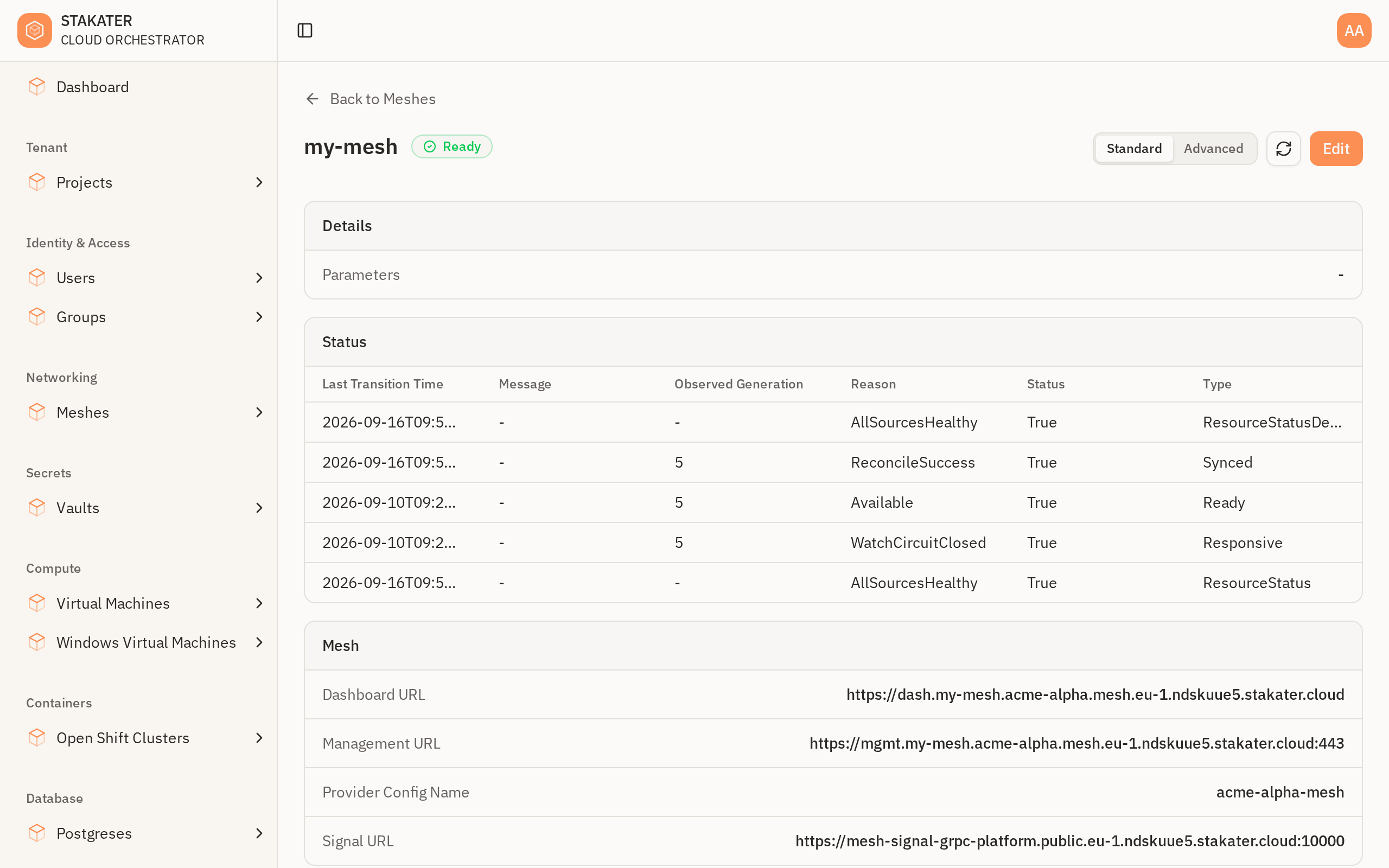
The management URL is not a web page. Opening it in a browser shows "page not found"; it is only ever passed to the NetBird client. Enrol your device:
netbird up --management-url=<management URL from the Mesh detail page>
A browser window opens for single sign-on. Leave the command running until the browser flow completes: the client owns the sign-in callback, and interrupting it makes a successful login look like a failure.
Confirm the client is connected:
netbird status
Management and Signal should both read Connected. Networks: - in that output is cosmetic and does not mean routes are missing. Allow a minute or two after enrolling before the cluster's addresses respond.
Tip
Group membership takes effect at sign-in. If you were added to a group under access.groups, or to <cluster>-mesh-access, after you enrolled, run netbird down and then netbird up again so your new membership is picked up.
See Create a Mesh for the full enrolment walkthrough and One Identity Across Your Organisation for multi-account caveats.
Step 3: Open the Cluster Console#
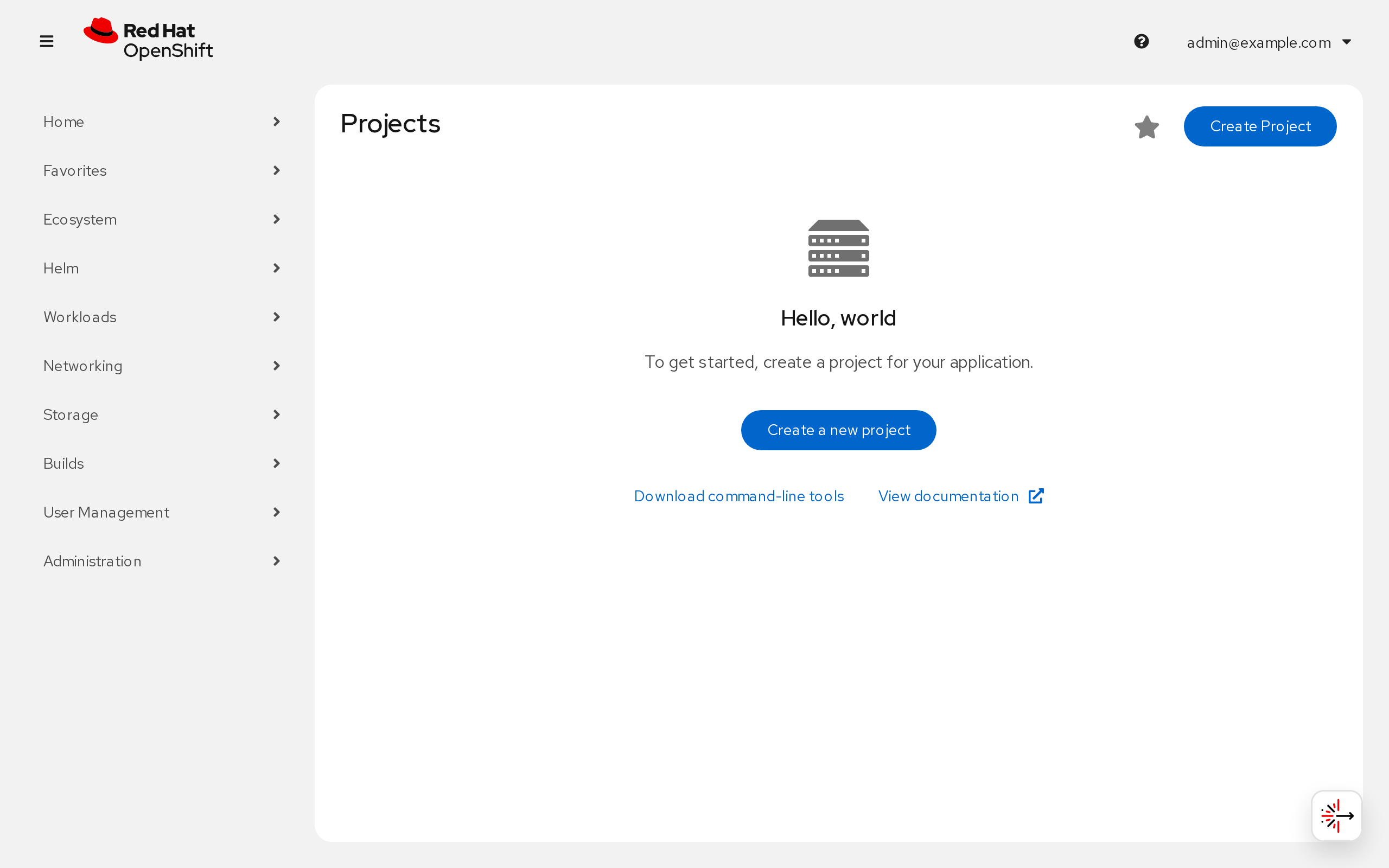
Open the Console URL from Step 1 in your browser. The cluster console uses your organisation's single sign-on. If you are already signed in to the Stakater Cloud Orchestrator console in the same browser, it signs you in without a prompt; otherwise you are redirected to your organisation's sign-in page. Either way you land on the cluster's Projects page:
Note
A fresh cluster shows no projects and offers to create one. That is normal when you have a role but nothing has been deployed yet. If you expected to see existing projects and do not, your network path works but your group has no role that covers them: ask whoever owns the claim to check your group and its role under access.groups.
Note
The first sign-in can show Invalid parameter or "state did not contain a valid CSRF token". It is harmless. Open the console URL again rather than refreshing the page, because a refresh replays the expired sign-in.
If the Console Does Not Resolve#
A private cluster's hostnames deliberately resolve to internal addresses. Many corporate and ISP resolvers refuse internal addresses for public hostnames as a security measure, so the page fails with a DNS error even though the mesh is connected. Check whether a public resolver answers where yours does not:
nslookup console-openshift-console.apps.<cluster>.<base-domain>
nslookup console-openshift-console.apps.<cluster>.<base-domain> 8.8.8.8
If only the second one answers, route those domains to a public resolver. Two domains are involved: the cluster's own domain, and the sign-in endpoint, which lives on the platform's domain. On macOS:
sudo mkdir -p /etc/resolver
printf 'nameserver 8.8.8.8\n' | sudo tee /etc/resolver/<cluster>.<base-domain>
printf 'nameserver 8.8.8.8\n' | sudo tee /etc/resolver/<platform sign-in domain>
sudo dscacheutil -flushcache; sudo killall -HUP mDNSResponder
The sign-in domain is the host part of the address your browser reports as unreachable after the redirect, for example oauth-hypershift-<cluster>.<platform-domain>. Remove the files to undo.
On Linux with systemd-resolved, set the same per-domain forwarding on your network interface. ip route show default names it:
sudo resolvectl dns <interface> 8.8.8.8
sudo resolvectl domain <interface> '~<cluster>.<base-domain>' '~<platform sign-in domain>'
sudo resolvectl revert <interface> undoes it, and the setting is also lost when the interface reconnects.
Windows has no per-domain resolver files. Set a public resolver as the DNS server of your network adapter instead.
If Pages Hang or Load Only Partly#
The mesh tunnel has a default MTU of 1280. When your connection to the cluster is relayed rather than direct, the path can carry less than that, and larger packets are dropped without an error. Small requests still get through, so the symptoms are misleading:
netbird statusreadsConnected, andnslookupandcurlagainst the console succeed- the browser stays on a blank page, hangs on the redirect to the sign-in page, or loads the console frame without its content
occommands that return a lot of output stall
Check whether the connection is relayed and, on Linux, what the tunnel MTU is:
netbird status -d | grep "Connection type"
ip link show wt0 | grep -o "mtu [0-9]*"
If the connection type is Relayed, reconnect with a smaller MTU:
netbird down
netbird up --mtu 1200 --management-url=<management URL>
You are usually not asked to sign in again. The setting is kept for later connections on that device.
Step 4: Connect with the CLI#
In the cluster console, open your user menu and choose Copy login command to get a token:
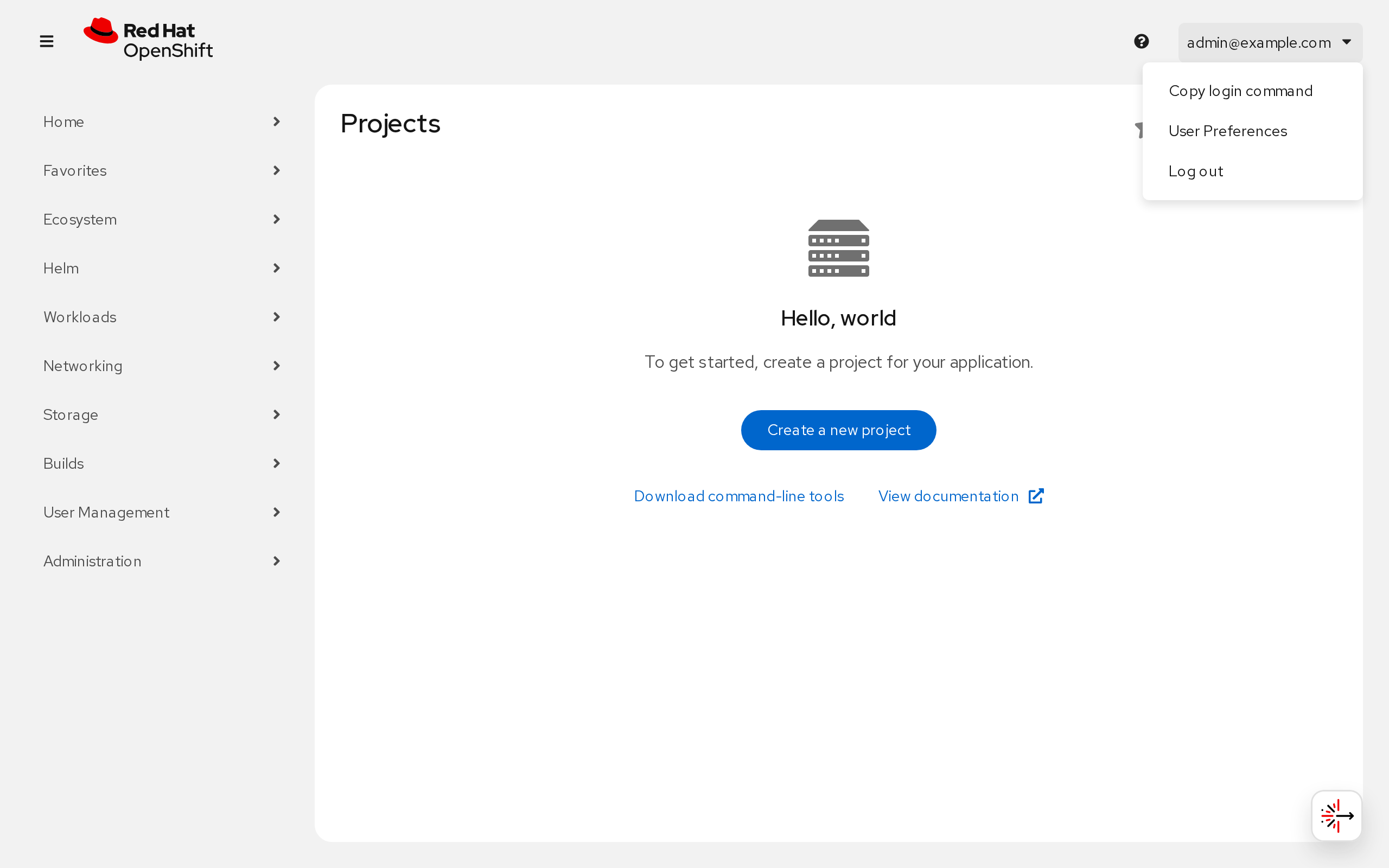
Log in with the hostname from the API endpoint. The raw IP address times out, because TLS and routing are set up for the name:
oc login --token=<token> --server=https://api.<cluster>.<base-domain>:6443
Verify:
oc whoami
oc get projects
Troubleshooting#
| Symptom | Likely cause | What to do |
|---|---|---|
| Console or API times out | Not enrolled in the mesh, or not in a group under access.groups or in <cluster>-mesh-access |
Check netbird status; ask whoever owns the claim to add your group under access.groups; run netbird down and netbird up again |
Invalid parameter or a CSRF token error on first sign-in |
The sign-in expired before it completed | Open the console URL again; do not refresh |
DNS address could not be found for the console or the sign-in page |
Your local resolver drops private-address answers | Per-domain public resolver entries, see If the Console Does Not Resolve |
Blank page, a hang on the sign-in redirect, or a console frame with no content, while curl to the same address works |
MTU too large for a relayed mesh connection | Reconnect with netbird up --mtu 1200, see If Pages Hang or Load Only Partly |
netbird up ignores a new management URL |
A stale profile survives netbird down |
Stop the client, move /var/lib/netbird/default.json aside, start it and enrol again |
oc login times out against an IP |
Connecting by address instead of name | Use https://api.<cluster>.<base-domain>:6443 |
| Signed in, console is empty | Network access only, through <cluster>-mesh-access, with no role |
Add your group under access.groups on the claim |
What's Next?#
- Provision an OpenShift Cluster - Create another cluster or change its access groups
- Create a Mesh - Enrol more devices and manage mesh groups
- Expose an Internal Service via the Mesh - Publish services running on the cluster to mesh peers